Docker basics
This chapter introduces containerization with Docker and relevant concepts such as image and volume. By the end of this chapter you are able to:
- Run containerized applications
- Containerize applications
- Utilize volumes to store data persistently outside of the containers.
- Use port mapping to enable access via TCP to containerized applications
- Share your own containers publicly
Definitions and basic concept
What is DevOps
The term itself consists of two parts Dev and Ops. Dev refers to the development of software and Ops to operations. Simple definition for DevOps would be that it means the release, configuring, and monitoring of software is in the hand people who develop it.
What is Docker
“Docker is a set of platform as a service (PaaS) products that use OS-level virtualization to deliver software in packages called containers.” - from Wikipedia(opens in a new tab).
So we get two definitions: 1. Docker is a set of tools to deliver software incontainers. 2. Containers are packages of software. 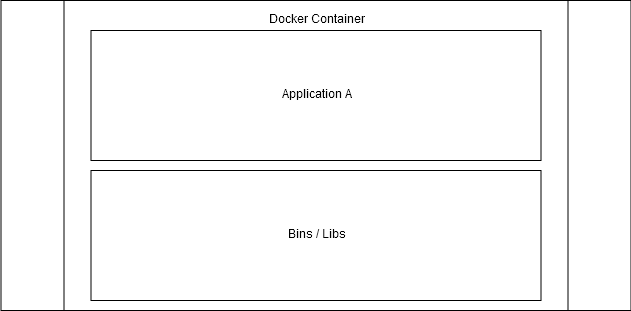
The above image illustrate how containers include the application and its dependencies. These containers are isolated so that they don’t interfere with each other or the software running outside of the containers. If we want to enable interactions between them, Docker offers tools to do so.
Benefits from containers
Containers package applications. In different scenarios: ### Scenario 1: Works on my machine
Let’s first take a closer look into what happens in web development without containers following the chain above starting from “Plan”.
First we plan an application. Then our team of 1-n developers create the software. It works on one’s computer. It may even go through a testing pipeline working perfectly. We send it to the server and it does not work.
This is known as the “works on my machine” problem. The only way to solve this is by finding out what in tarnation the developer had installed on their machine that made the application work.
Containers solve this problem by allowing the developer to personally run the application inside a container, which then includes all of the dependencies required for the app to work.
- You may still occasionally hear about “works in my container” issues - these are often just usage errors. ### Scenario 2: Isolated environments
We have 5 different Python applications. We need to deploy them to a server that already has an application requiring Python 2.7 and of course none of our applications are 2.7. What do we do now?
Since containers package the software with all of its dependencies, we package the existing app and all 5 new ones with their respective Python versions and that’s it.
Sometimes different parts of a system may change over time, possibly leading to the application not working. These changes may be anything from an operating system update to changes in dependencies.
Scenario 3: Development
We are brought into a dev team. They run a web app that uses other services when running: a Postgres database, MongoDB, Redis and a number of others. Simple enough, we install whatever is required to run the application and all of the applications that it depends on …
What a headache to start installing and then managing the development databases on your own machine.
Thankfully, by the time we are told to do that we are already a Docker expert. With one command we get an isolated application, like Postgres or Mongo, running in our machine.
Scenario 4: Scaling
Starting and stopping a Docker container has little overhead. But when we run our own Netflix or Facebook, we want to meet the changing demand. With some advanced tooling that we will learn about in parts 2 and 3, we can spin up multiple containers instantly and load balance traffic between them.
Container orchestration will be discussed in parts 2 and 3. But the simplest example: what happens when one application dies? The orchestration system notices it, splits traffic between the working replicas, and spins up a new container to replace the dead one.
Virtual machines
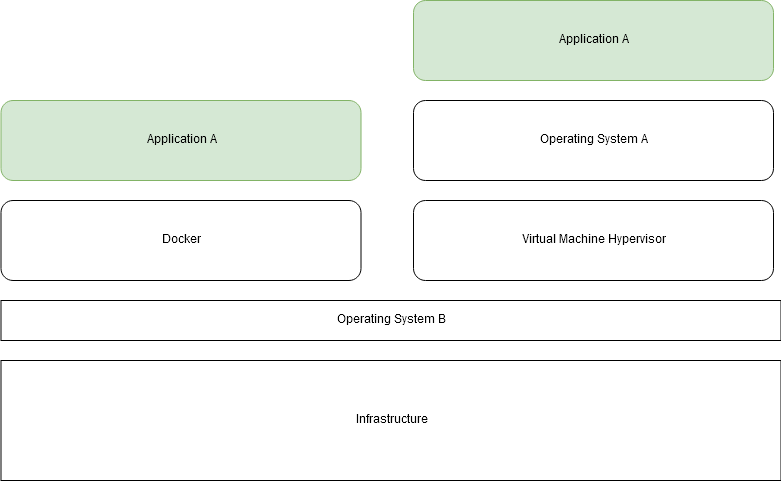
VM virtualizes the physical hardware. Each VM includes a full OS along with the necessary binaries and libraries, making them heavier and more resources-intensive. Containers, on the other hand, share the host OS kernel and only package the application and its dependencies, resulting in a more lightweight and efficient solution.
VMs provide strong isolation and are suited for running multiple OS environments, but they have a performance overhead and longer startup times. Containers offer faster startup, better resource utilization, and high portability across different environments, though their isolation is at the process level, which may not be as robust as that of VMs. Overall, VMs could be used for scenarios needing complete OS environments, while containers excel in lightweight, efficient, and consistent application deployment.
Docker relies on Linux kernels, which means that macOS and Windows cannot run Docker natively without some additional steps. Each operating system has its own solution for running docker.
Image and containers
Since we already know what containers are it’s easier to explain images through them: Containers are instances of images. A basic mistake is to confuse images and containers.
Cooking metaphor:
Think of a container as a ready-to-eat meal that we can simply heat up and consume. An image, on the other hand, is the recipe and the ingredients for that meal.
So just like how we need a recipe and ingredients to make a meal, we need an image and a container runtime (Docker engine) to create a container. The image provides all the necessary instructions and dependencies for the container to run, just like a recipe provides the steps and ingredients to make a meal.
In short, an image is like a blueprint or template and the building material, while a container is an instance of that blueprint or template.
Image
A Docker image is a file. An image never changes; we cannot edit an existing file. Creating a new image happens by starting from a base image and adding new layers to it. We will talk about layers later, but we should think of images as immutable, they can not be changed after they are created.
List all of ours image with docker image ls
$ docker image ls
  REPOSITORY      TAG      IMAGE ID       CREATED         SIZE
  hello-world     latest   d1165f221234   9 days ago      13.3kB
Containers are created from images, so when we ran hello-world twice we downloaded one image and created two of them from the single image.
Well then, if images are used to create containers, where do images come from? This image file is built from an instructional file named Dockerfile that is parsed when we run docker image build.
Dockerfile is a file that is by default called Dockerfile, that looks something like this
FROM <image>:<tag>

RUN <install some dependencies>

CMD <command that is executed on `docker container run`>
and is the instruction set for building an image. We will look into Dockerfiles later when we to build our own images.
If we go back to the cooking metaphor, as Dockerfile provides the instructions needed to build an image we can think of that as the recipe for images. We’re now 2 recipes deep, as a Dockerfile is the recipe for an image and an image is the recipe for the container. The only difference is that Dockerfile is written by us, whereas image is written by our machine based on the Dockerfile.
Container
Containers only contain what is required to execute an application; and we can start, stop and interact with them. They are isolated environments in the host machine with the ability to interact with each other and the host machine itself via defined method (TCP/UDP).
List all of our containers with docker container ls
$ docker container ls
  CONTAINER ID   IMAGE     COMMAND   CREATED   STATUS    PORTS     NAMES
Without -a flag it will only print running containers.
$ docker container ls -a
  CONTAINER ID   IMAGE           COMMAND      CREATED          STATUS                      PORTS     NAMES
  b7a53260b513   hello-world     "/hello"     5 minutes ago    Exited (0) 5 minutes ago              brave_bhabha
  1cd4cb01482d   hello-world     "/hello"     8 minutes ago    Exited (0) 8 minutes ago              vibrant_bell